> ## Documentation Index
> Fetch the complete documentation index at: https://portkey-docs-mintlify-enhance-budget-policies-param-docs-45.mintlify.site/llms.txt
> Use this file to discover all available pages before exploring further.
# Claude Code
> Integrate Portkey with Claude Code for enterprise-grade AI coding assistance with observability and governance
Claude Code is Anthropic's agentic coding tool that lives in your terminal, understands your codebase, and helps you code faster through natural language commands.
With Portkey integration, you can enhance Claude Code with enterprise features:
* **Unified AI Gateway** - Route Claude Code through multiple providers (Anthropic, Bedrock, Vertex AI)
* **Centralized AI observability**: Real-time usage tracking for 40+ key metrics and logs for every request
* **Governance** - Real-time spend tracking, set budget limits and RBAC in your Claude Code setup
# 1. Setting up Portkey
Portkey allows you to use 1600+ LLMs with your Claude Code setup, with minimal configuration required. Let's set up the core components in Portkey that you'll need for integration.
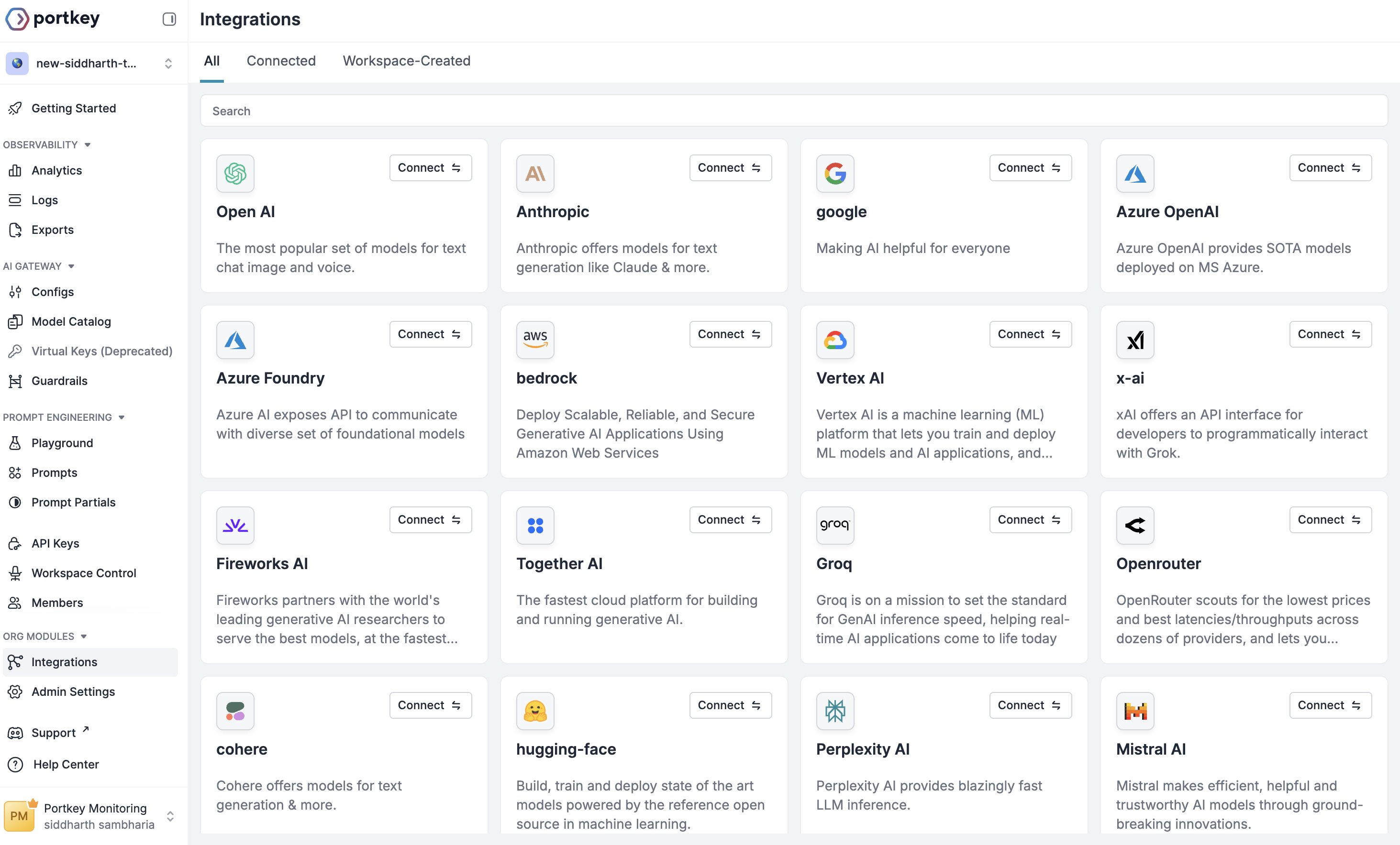
Navigate to the [Integrations](https://app.portkey.ai/integrations) section on Portkey's Sidebar. This is where you'll connect your LLM providers.
1. Find your preferred provider (Anthropic, Bedrock, and Vertex AI)
2. Click **Connect** on the provider card
3. In the "Create New Integration" window:
* Enter a **Name** for reference
* Enter a **Slug** for the integration
* Enter your **API Key and other provider-specific details** for the provider
4. Click **Next Step**
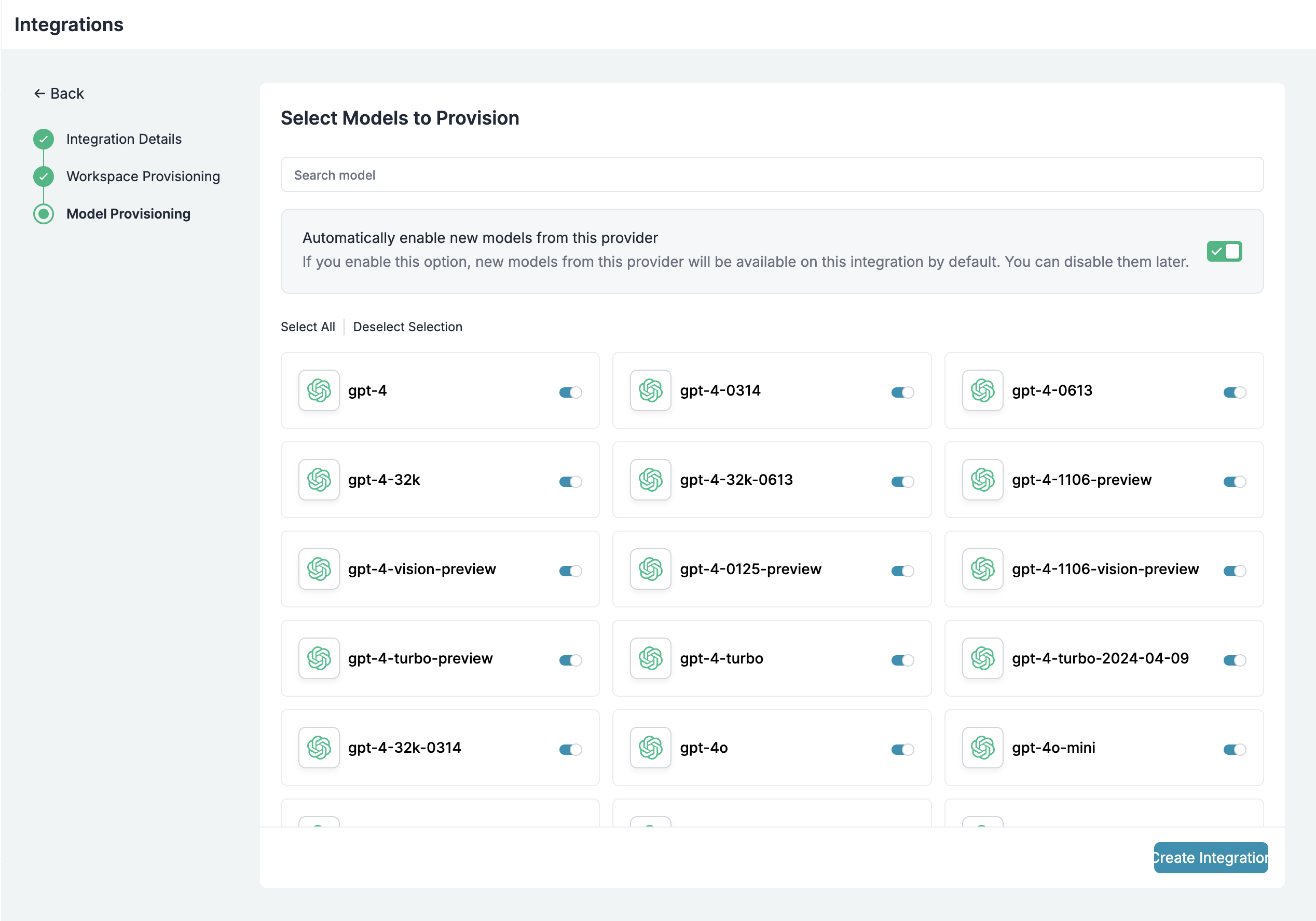
 In your next step you'll see workspace provisioning options. You can select the default "Shared Team Workspace" if this is your first time OR chose your current one.
On the model provisioning page:
* Leave all models selected (or customize)
* Toggle Automatically enable new models if desired
Click **Create Integration** to complete the integration
Make sure you enable the models that work with Claude Code
In your next step you'll see workspace provisioning options. You can select the default "Shared Team Workspace" if this is your first time OR chose your current one.
On the model provisioning page:
* Leave all models selected (or customize)
* Toggle Automatically enable new models if desired
Click **Create Integration** to complete the integration
Make sure you enable the models that work with Claude Code
 Once your Integration is created:
1. Go to [Model Catalog](https://app.portkey.ai/model-catalog) → **AI Providers** tab
2. Find and copy your provider slug (e.g., `@anthropic-claude-code`)
Once your Integration is created:
1. Go to [Model Catalog](https://app.portkey.ai/model-catalog) → **AI Providers** tab
2. Find and copy your provider slug (e.g., `@anthropic-claude-code`)
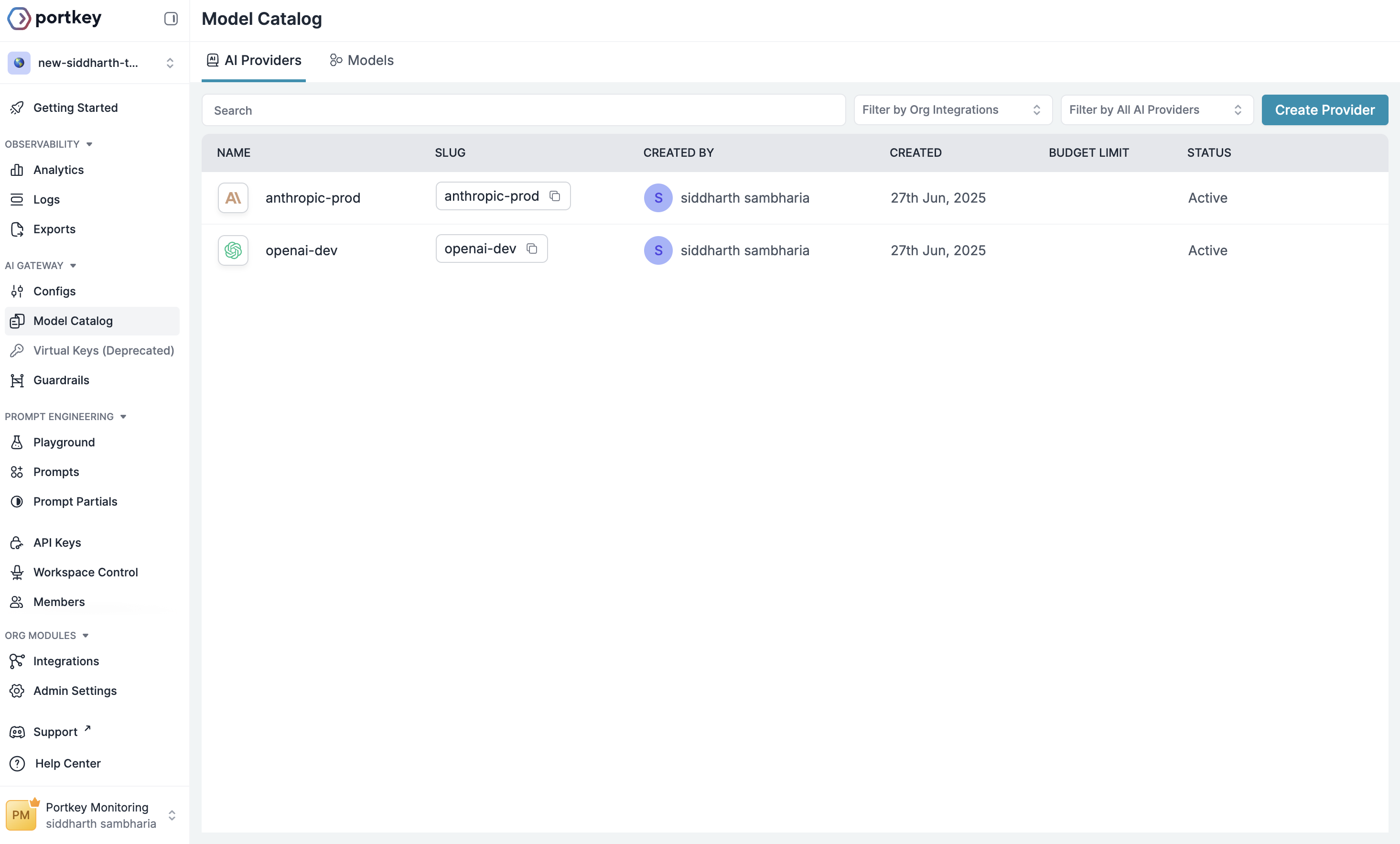 This is your unique identifier - you'll need it for the next step. This slug is basically `@your-provider-slug`
Finally, create a Portkey API key:
1. Go to [API Keys](https://app.portkey.ai/api-keys) in Portkey
2. Create a new API key
This is your unique identifier - you'll need it for the next step. This slug is basically `@your-provider-slug`
Finally, create a Portkey API key:
1. Go to [API Keys](https://app.portkey.ai/api-keys) in Portkey
2. Create a new API key
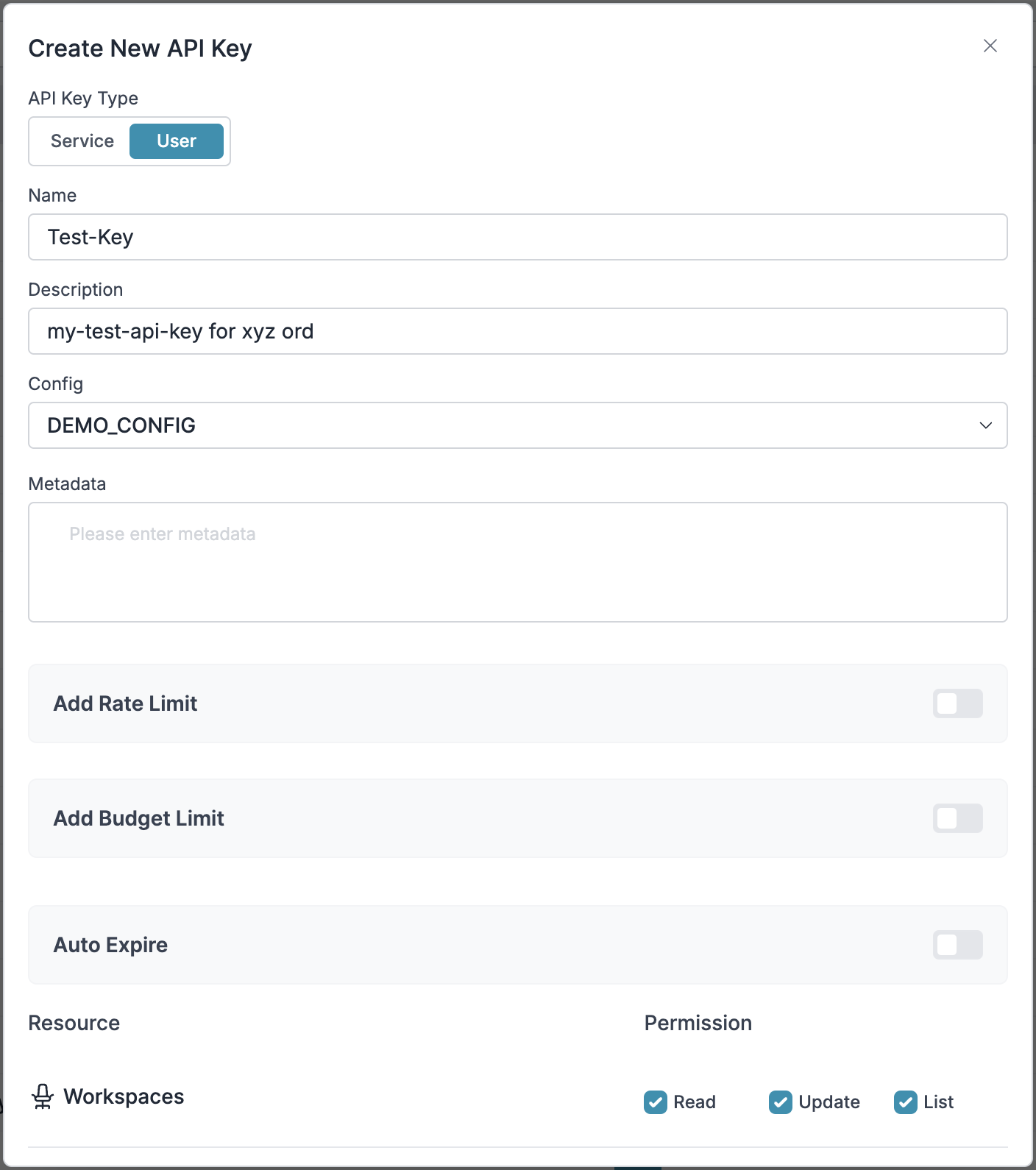 Save your API key securely - you'll need it for Claude Code integration.
🎉 Voila, Setup complete! You now have everything needed to integrate Portkey with your application.
## 2. Integrate Portkey with Claude Code
Claude Code uses a `settings.json` file for configuration. You'll need to modify the environment variables to route requests through Portkey.
For more details on Claude Code proxy configuration, see [Anthropic's documentation](https://docs.anthropic.com/en/docs/claude-code/bedrock-vertex-proxies).
Edit your Claude Code settings file (`~/.claude/settings.json` for global or `.claude/settings.json` in your project):
```json theme={null}
{
"env": {
"ANTHROPIC_BASE_URL": "https://api.portkey.ai",
"ANTHROPIC_AUTH_TOKEN": "dummy",
"ANTHROPIC_CUSTOM_HEADERS": "x-portkey-api-key: YOUR_PORTKEY_API_KEY\nx-portkey-provider: @YOUR_PROVIDER_SLUG"
}
}
```
This same JSON will work for Anthropic, Bedrock and Vertex. You will need your Portkey API key created in [Step 1](#Setting-up-portkey) for this integration
# 3. Set Up Enterprise Governance for Claude Code
**Why Enterprise Governance?**
If you are using Claude Code inside your organization, you need to consider several governance aspects:
* **Cost Management**: Controlling and tracking AI spending across teams
* **Access Control**: Managing team access and workspaces
* **Usage Analytics**: Understanding how AI is being used across the organization
* **Security & Compliance**: Maintaining enterprise security standards
* **Reliability**: Ensuring consistent service across all users
* **Model Management**: Managing what models are being used in your setup
Portkey adds a comprehensive governance layer to address these enterprise
**Enterprise Implementation Guide**
### Step 1: Implement Budget Controls & Rate Limits
Model Catalog enables you to have granular control over LLM access at the team/department level. This helps you:
* Set up [budget limits](/product/ai-gateway/virtual-keys/budget-limits)
* Prevent unexpected usage spikes using Rate limits
* Track departmental spending
#### Setting Up Department-Specific Controls:
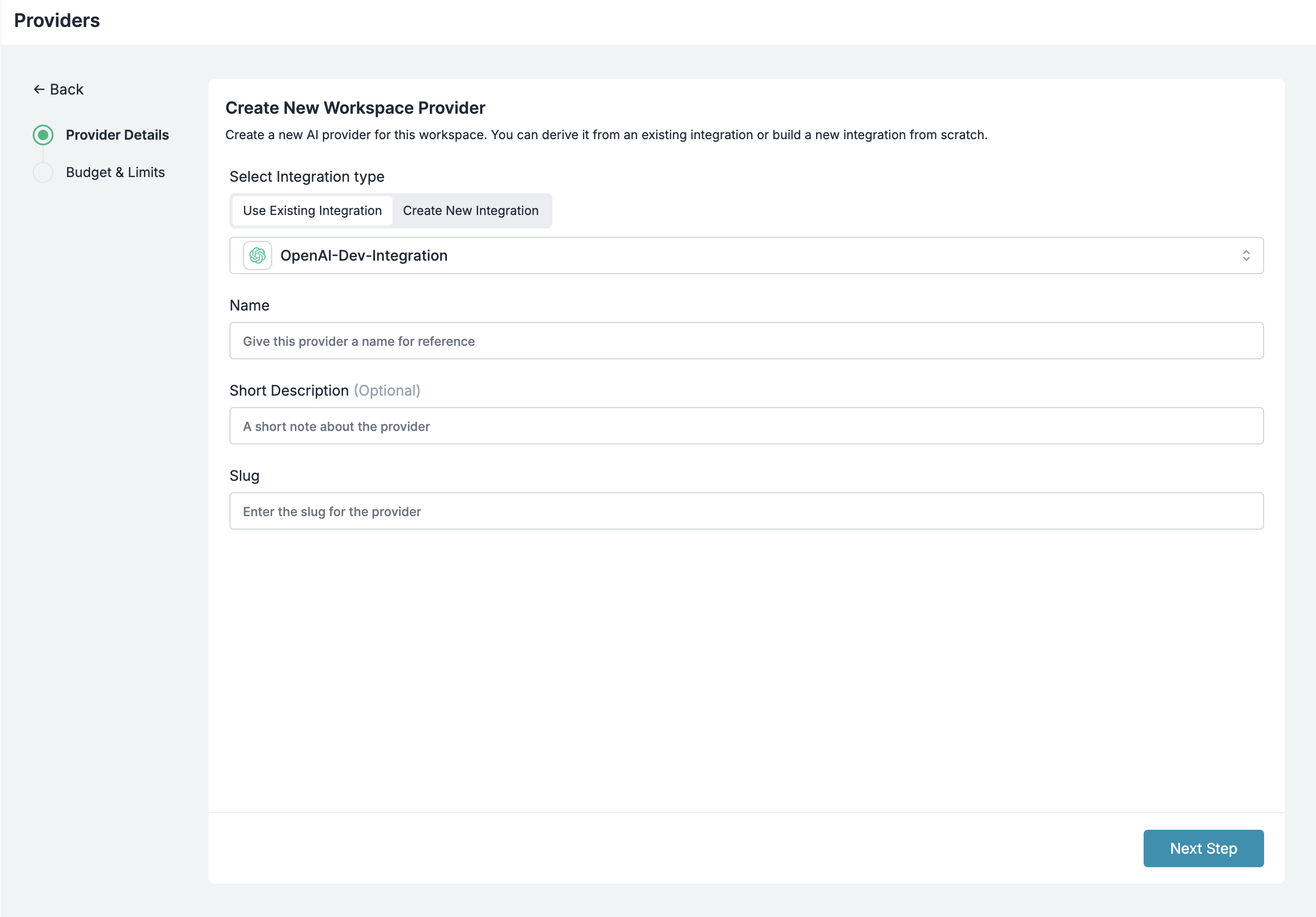
1. Navigate to [Model Catalog](https://app.portkey.ai/model-catalog) in the Portkey dashboard
2. Create new Provider for each engineering team with budget limits and rate limits
3. Configure department-specific limits
Save your API key securely - you'll need it for Claude Code integration.
🎉 Voila, Setup complete! You now have everything needed to integrate Portkey with your application.
## 2. Integrate Portkey with Claude Code
Claude Code uses a `settings.json` file for configuration. You'll need to modify the environment variables to route requests through Portkey.
For more details on Claude Code proxy configuration, see [Anthropic's documentation](https://docs.anthropic.com/en/docs/claude-code/bedrock-vertex-proxies).
Edit your Claude Code settings file (`~/.claude/settings.json` for global or `.claude/settings.json` in your project):
```json theme={null}
{
"env": {
"ANTHROPIC_BASE_URL": "https://api.portkey.ai",
"ANTHROPIC_AUTH_TOKEN": "dummy",
"ANTHROPIC_CUSTOM_HEADERS": "x-portkey-api-key: YOUR_PORTKEY_API_KEY\nx-portkey-provider: @YOUR_PROVIDER_SLUG"
}
}
```
This same JSON will work for Anthropic, Bedrock and Vertex. You will need your Portkey API key created in [Step 1](#Setting-up-portkey) for this integration
# 3. Set Up Enterprise Governance for Claude Code
**Why Enterprise Governance?**
If you are using Claude Code inside your organization, you need to consider several governance aspects:
* **Cost Management**: Controlling and tracking AI spending across teams
* **Access Control**: Managing team access and workspaces
* **Usage Analytics**: Understanding how AI is being used across the organization
* **Security & Compliance**: Maintaining enterprise security standards
* **Reliability**: Ensuring consistent service across all users
* **Model Management**: Managing what models are being used in your setup
Portkey adds a comprehensive governance layer to address these enterprise
**Enterprise Implementation Guide**
### Step 1: Implement Budget Controls & Rate Limits
Model Catalog enables you to have granular control over LLM access at the team/department level. This helps you:
* Set up [budget limits](/product/ai-gateway/virtual-keys/budget-limits)
* Prevent unexpected usage spikes using Rate limits
* Track departmental spending
#### Setting Up Department-Specific Controls:
1. Navigate to [Model Catalog](https://app.portkey.ai/model-catalog) in the Portkey dashboard
2. Create new Provider for each engineering team with budget limits and rate limits
3. Configure department-specific limits
 ### Step 2: Define Model Access Rules
As your AI usage scales, controlling which teams can access specific models becomes crucial. You can simply manage AI models in your org by provisioning model at the top integration level.
Portkey allows you to control your routing logic very simply with its Configs feature. Portkey Configs provide this control layer with things like:
* **Data Protection**: Implement guardrails for sensitive code and data
* **Reliability Controls**: Add fallbacks, load-balance, retry ,and smart conditional routing logic
* **Caching**: Implement Simple and Semantic Caching. and more....
#### Example Configuration:
Here's a basic configuration to load-balance requests to Anthropic and Anthropic:
```json theme={null}
{
"strategy": {
"mode": "load-balance"
},
"targets": [
{
"override_params": {
"model": "@YOUR_Anthropic_PROVIDER_SLUG/gpt-model"
}
},
{
"override_params": {
"model": "@YOUR_ANTHROPIC_PROVIDER/claude-sonnet-model"
}
}
]
}
```
Create your config on the [Configs page](https://app.portkey.ai/configs) in your Portkey dashboard. You'll need the config ID for connecting to Claude Code's setup.
Configs can be updated anytime to adjust controls without affecting running applications.
### Step 3: Implement Access Controls
Create User-specific API keys that automatically:
* Track usage per developer/team with the help of metadata
* Apply appropriate configs to route requests
* Collect relevant metadata to filter logs
* Enforce access permissions
Create API keys through:
* [Portkey App](https://app.portkey.ai/)
* [API Key Management API](/api-reference/admin-api/control-plane/api-keys/create-api-key)
Example using Python SDK:
```python theme={null}
from portkey_ai import Portkey
portkey = Portkey(api_key="YOUR_ADMIN_API_KEY")
api_key = portkey.api_keys.create(
name="frontend-engineering",
type="organisation",
workspace_id="YOUR_WORKSPACE_ID",
defaults={
"config_id": "your-config-id",
"metadata": {
"environment": "development",
"department": "engineering",
"team": "frontend"
}
},
scopes=["logs.view", "configs.read"]
)
```
For detailed key management instructions, see our [API Keys documentation](/api-reference/admin-api/control-plane/api-keys/create-api-key).
### Step 4: Deploy & Monitor
After distributing API keys to your engineering teams, your enterprise-ready Claude Code setup is ready to go. Each developer can now use their designated API keys with appropriate access levels and budget controls.
Apply your governance setup using the integration steps from earlier sections
Monitor usage in the Portkey dashboard:
* Cost tracking by the engineering team
* Model usage patterns for AI agent tasks
* Request volumes
* Error rates and debugging logs
### Max Plan and Anthropic Oauth (Enterprise Only)
If you are using max plan or logging in with anthropic, you can still use Portkey to track usage and cost, apply ratelimiting and more.
Here is an example of how to configure your `~/.claude/settings.json` to use Portkey with max plan or anthropic oauth:
```json theme={null}
{
"env": {
"ANTHROPIC_BASE_URL": "https://api.portkey.ai",
"ANTHROPIC_CUSTOM_HEADERS": "x-portkey-api-key: YOUR_PORTKEY_API_KEY",
}
}
```
### Enterprise Features Now Available
**Claude Code now has:**
* Per-developer budget controls
* Model access governance
* Usage tracking & attribution
* Code security guardrails
* Reliability features for development workflows
# Portkey Features
Now that you have enterprise-grade Claude Code setup, let's explore the comprehensive features Portkey provides to ensure secure, efficient, and cost-effective AI-assisted development.
### 1. Comprehensive Metrics
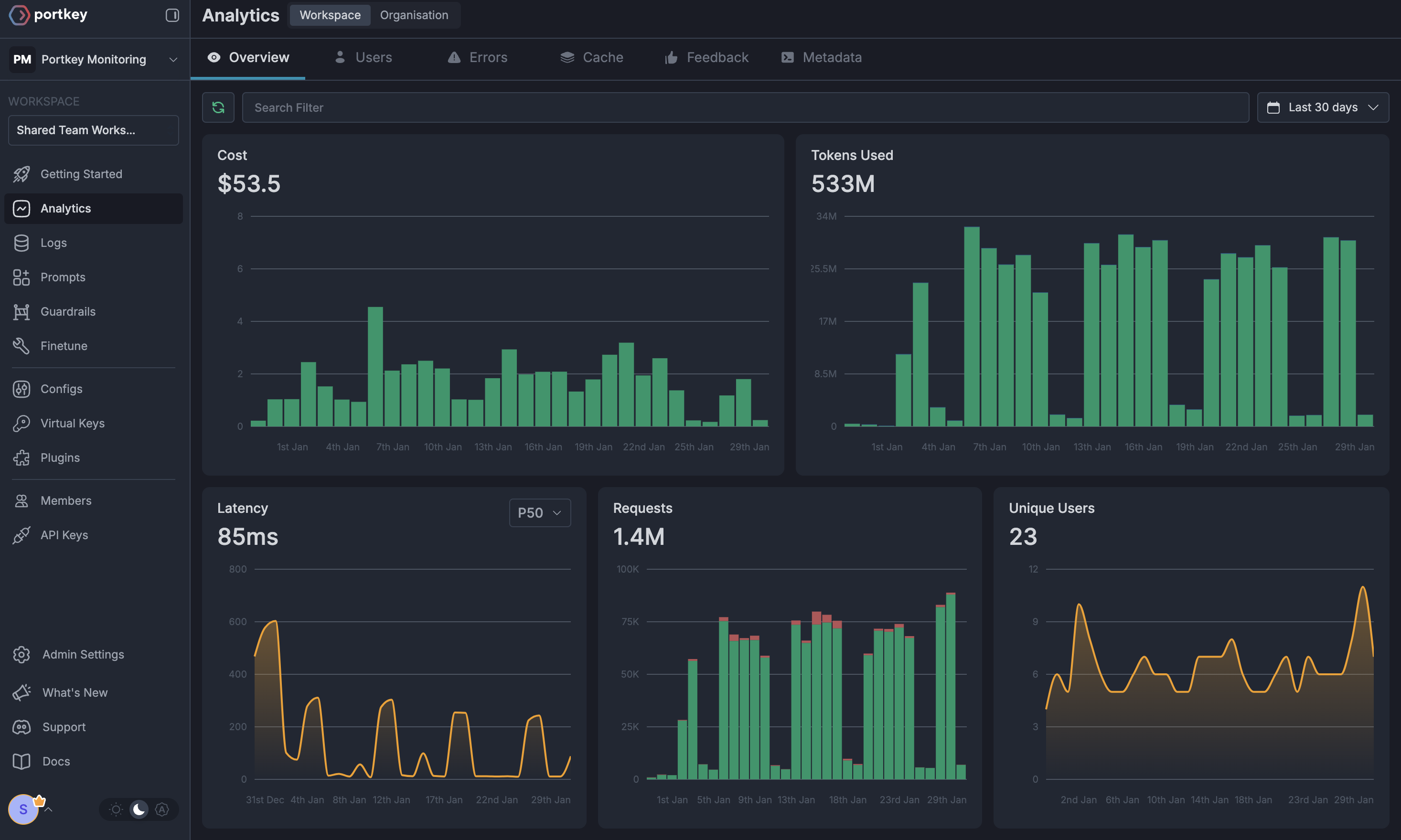
Using Portkey you can track 40+ key metrics including cost, token usage, response time, and performance across all your LLM providers in real time. Filter these metrics by developer, team, or project using custom metadata.
### Step 2: Define Model Access Rules
As your AI usage scales, controlling which teams can access specific models becomes crucial. You can simply manage AI models in your org by provisioning model at the top integration level.
Portkey allows you to control your routing logic very simply with its Configs feature. Portkey Configs provide this control layer with things like:
* **Data Protection**: Implement guardrails for sensitive code and data
* **Reliability Controls**: Add fallbacks, load-balance, retry ,and smart conditional routing logic
* **Caching**: Implement Simple and Semantic Caching. and more....
#### Example Configuration:
Here's a basic configuration to load-balance requests to Anthropic and Anthropic:
```json theme={null}
{
"strategy": {
"mode": "load-balance"
},
"targets": [
{
"override_params": {
"model": "@YOUR_Anthropic_PROVIDER_SLUG/gpt-model"
}
},
{
"override_params": {
"model": "@YOUR_ANTHROPIC_PROVIDER/claude-sonnet-model"
}
}
]
}
```
Create your config on the [Configs page](https://app.portkey.ai/configs) in your Portkey dashboard. You'll need the config ID for connecting to Claude Code's setup.
Configs can be updated anytime to adjust controls without affecting running applications.
### Step 3: Implement Access Controls
Create User-specific API keys that automatically:
* Track usage per developer/team with the help of metadata
* Apply appropriate configs to route requests
* Collect relevant metadata to filter logs
* Enforce access permissions
Create API keys through:
* [Portkey App](https://app.portkey.ai/)
* [API Key Management API](/api-reference/admin-api/control-plane/api-keys/create-api-key)
Example using Python SDK:
```python theme={null}
from portkey_ai import Portkey
portkey = Portkey(api_key="YOUR_ADMIN_API_KEY")
api_key = portkey.api_keys.create(
name="frontend-engineering",
type="organisation",
workspace_id="YOUR_WORKSPACE_ID",
defaults={
"config_id": "your-config-id",
"metadata": {
"environment": "development",
"department": "engineering",
"team": "frontend"
}
},
scopes=["logs.view", "configs.read"]
)
```
For detailed key management instructions, see our [API Keys documentation](/api-reference/admin-api/control-plane/api-keys/create-api-key).
### Step 4: Deploy & Monitor
After distributing API keys to your engineering teams, your enterprise-ready Claude Code setup is ready to go. Each developer can now use their designated API keys with appropriate access levels and budget controls.
Apply your governance setup using the integration steps from earlier sections
Monitor usage in the Portkey dashboard:
* Cost tracking by the engineering team
* Model usage patterns for AI agent tasks
* Request volumes
* Error rates and debugging logs
### Max Plan and Anthropic Oauth (Enterprise Only)
If you are using max plan or logging in with anthropic, you can still use Portkey to track usage and cost, apply ratelimiting and more.
Here is an example of how to configure your `~/.claude/settings.json` to use Portkey with max plan or anthropic oauth:
```json theme={null}
{
"env": {
"ANTHROPIC_BASE_URL": "https://api.portkey.ai",
"ANTHROPIC_CUSTOM_HEADERS": "x-portkey-api-key: YOUR_PORTKEY_API_KEY",
}
}
```
### Enterprise Features Now Available
**Claude Code now has:**
* Per-developer budget controls
* Model access governance
* Usage tracking & attribution
* Code security guardrails
* Reliability features for development workflows
# Portkey Features
Now that you have enterprise-grade Claude Code setup, let's explore the comprehensive features Portkey provides to ensure secure, efficient, and cost-effective AI-assisted development.
### 1. Comprehensive Metrics
Using Portkey you can track 40+ key metrics including cost, token usage, response time, and performance across all your LLM providers in real time. Filter these metrics by developer, team, or project using custom metadata.
 ### 2. Advanced Logs
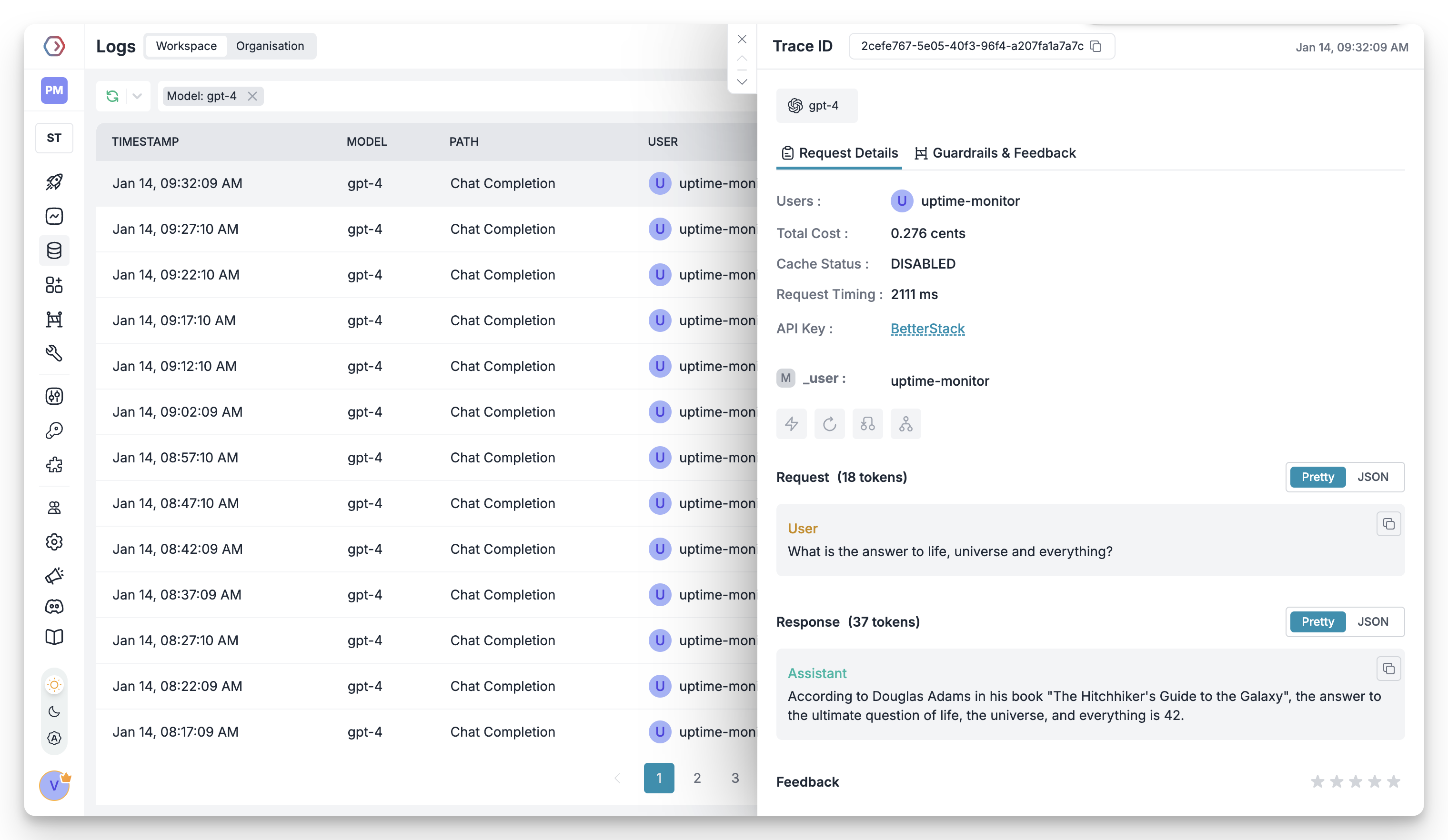
Portkey's logging dashboard provides detailed logs for every request made by Claude Code. These logs include:
* Complete request and response tracking
* Code context and generation metrics
* Developer attribution
* Cost breakdown per coding session
### 2. Advanced Logs
Portkey's logging dashboard provides detailed logs for every request made by Claude Code. These logs include:
* Complete request and response tracking
* Code context and generation metrics
* Developer attribution
* Cost breakdown per coding session
 ### 3. Unified Access to 250+ LLMs
Easily switch between 250+ LLMs for different coding tasks. Use GPT-4 for complex architecture decisions, Claude for detailed code reviews, or specialized models for specific languages - all through a single interface.
### 4. Advanced Metadata Tracking
Track coding patterns and productivity metrics with custom metadata:
* Language and framework usage
* Code generation vs completion tasks
* Time-of-day productivity patterns
* Project-specific metrics
### 5. Enterprise Access Management
Set and manage spending limits per developer or team. Prevent budget overruns with automatic cutoffs.
Enterprise-grade SSO integration for seamless developer onboarding and offboarding.
Hierarchical structure with teams, projects, and role-based access control for development organizations.
Comprehensive audit logging for security compliance and code generation tracking.
### 6. Reliability Features
Automatically switch between models if one fails, ensuring uninterrupted coding.
Route requests based on code complexity or language requirements.
Distribute requests across multiple API keys or providers.
Cache common code patterns to reduce costs and improve response times.
Automatic retry handling for failed requests with exponential backoff.
Enforce spending limits to control development costs.
### 7. Advanced Guardrails
Protect your codebase and enhance security with real-time checks on AI interactions:
* Prevent exposure of API keys and secrets
* Block generation of malicious code patterns
* Enforce coding standards and best practices
* Custom security rules for your organization
* License compliance checks
Implement real-time protection for your development environment with automatic detection and filtering of sensitive code, credentials, and security vulnerabilities.
# Next Steps
**Join our Community**
* [Discord Community](https://portkey.sh/discord-report)
* [GitHub Repository](https://github.com/Portkey-AI)
Schedule a 1:1 call with our team to see how Portkey can transform your development workflow with Claude Code. Get personalized recommendations for your team's specific needs.
For enterprise support and custom features for your development teams, contact our [enterprise team](https://calendly.com/portkey-ai).
### 3. Unified Access to 250+ LLMs
Easily switch between 250+ LLMs for different coding tasks. Use GPT-4 for complex architecture decisions, Claude for detailed code reviews, or specialized models for specific languages - all through a single interface.
### 4. Advanced Metadata Tracking
Track coding patterns and productivity metrics with custom metadata:
* Language and framework usage
* Code generation vs completion tasks
* Time-of-day productivity patterns
* Project-specific metrics
### 5. Enterprise Access Management
Set and manage spending limits per developer or team. Prevent budget overruns with automatic cutoffs.
Enterprise-grade SSO integration for seamless developer onboarding and offboarding.
Hierarchical structure with teams, projects, and role-based access control for development organizations.
Comprehensive audit logging for security compliance and code generation tracking.
### 6. Reliability Features
Automatically switch between models if one fails, ensuring uninterrupted coding.
Route requests based on code complexity or language requirements.
Distribute requests across multiple API keys or providers.
Cache common code patterns to reduce costs and improve response times.
Automatic retry handling for failed requests with exponential backoff.
Enforce spending limits to control development costs.
### 7. Advanced Guardrails
Protect your codebase and enhance security with real-time checks on AI interactions:
* Prevent exposure of API keys and secrets
* Block generation of malicious code patterns
* Enforce coding standards and best practices
* Custom security rules for your organization
* License compliance checks
Implement real-time protection for your development environment with automatic detection and filtering of sensitive code, credentials, and security vulnerabilities.
# Next Steps
**Join our Community**
* [Discord Community](https://portkey.sh/discord-report)
* [GitHub Repository](https://github.com/Portkey-AI)
Schedule a 1:1 call with our team to see how Portkey can transform your development workflow with Claude Code. Get personalized recommendations for your team's specific needs.
For enterprise support and custom features for your development teams, contact our [enterprise team](https://calendly.com/portkey-ai).